Schedule messages with Send later
Write your email now and we'll send it when your customer's most likely to read it – like first thing tomorrow morning.
Send later works for every email you send from YourTradebase, including quotes, invoices, reminders, job sheets, statements, receipts and event confirmations.
How to Send later
- Write your message as usual
-
Click the clock button next to Send now.
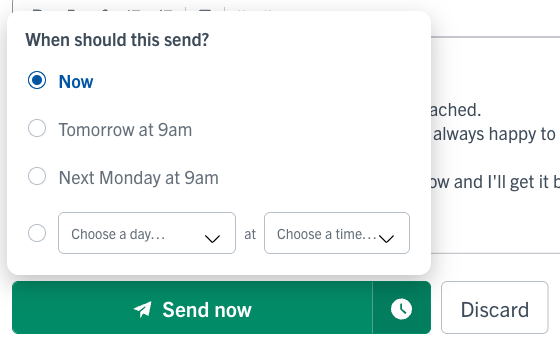
- Pick Tomorrow at 9am or Next Monday at 9am. Or choose your own day and time – any hour, up to two weeks ahead.
-
The button changes to show when your email will go - click it to schedule your email.

That's it. You'll see Message sending later, and we'll take it from there.
Then what happens?
Your quote or invoice stays as a draft, showing when it's sending, until the email goes out. Then it's marked as sent, just like normal.
We create the PDF and fill in any tags in your message (like totals or {{short_link}} ) at the moment it sends. So if you change the quote before then, your customer gets the latest version.
A few other handy things:
- Your customer won't see the email in their online portal until it's sent.
- If you ticked Notify customer via SMS, the text message goes out at the same time as the email.
See what's going out
You can find your scheduled emails in a few places:
- Home – Tomorrow at a glance shows how many messages are going out tomorrow. Click it to see them.
- Schedule – each email shows at the time it's sending, next to your auto-messages.
- Your morning "What's On Today" email – lists them under Messages going out.
Send it now – or stop it sending
Changed your mind? No problem.
- Open the email – click it on your Schedule, or click the link under Messages on the quote, invoice or job.
- Click Send now to send it straight away, or Cancel send to stop it.
- Click Yes, send now or Yes, cancel send to confirm.
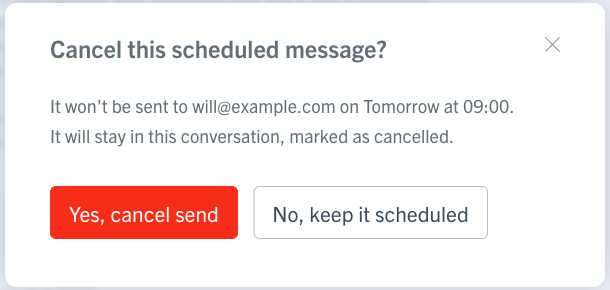
A cancelled email stays in your conversation, marked as cancelled, so you've always got a record of it. And if you delete a quote or invoice, we cancel any email that's waiting to send with it.
Can I change an email I've scheduled?
Not right now – but it only takes a moment to start again. Just cancel it, then write a new one with the changes you need.
What if it can't be sent?
If something stops your email going out – like every address bouncing – we'll send you a notification and mark it Not sent. Just check the details and click Send now to try again. You can find out more about what happens to bounced emails.
Now you can write your emails whenever it suits you, and still have them land at just the right time.
Need a bit more help? Just send us an email.